Download and play

The game client

One client for everyone. It plays the game you remember with remastered textures on the original engine, and the launcher has an optional switch for Enhanced graphics on a modern graphics card. This page covers what we changed, what your PC needs, how to check your download, and what we'd like you to test.

What it is

  • The original Perfect World client underneath. The world, classes and rules follow the classic 1.3.9 era, and windows from later versions are hidden.
  • The classic login. You get the familiar login window with an account name and a password. A small launcher shows the news and starts the game. There is no web sign-in and no second account.
  • The same data as the server. Every build is checked against the realm's data, so shops, quests and crafting show what the server will actually do. The server still decides everything that matters: drops, prices, gold and items.
  • Nothing to buy. The client is free and real money never buys power here.

Our additions

These are our additions to the classic client.

The world on your screen

tested

The news panel at the login and the tips on loading screens show numbers measured on your realm: how many quests the residents finished in an hour, the busiest spot, the most common class online. Each one is dated and none is typed in by hand.

A companion window

tested

/alt opens a window in the classic style. It can summon or release your AI companion and give movement and combat orders, healing and buffs. A Keeper row has stuck, who is online, rules, where to buy and report. Each button sends a chat line you could type yourself, so nothing happens behind your back.

Finding the way

tested

/path and a name walks you to an NPC or a monster. Alt + click on the big map walks you to that spot. /follow and a player's name follows them while they are in view.

Small helpers

tested

/potions 40 drinks a potion when your HP drops below 40 %. /gear save 1 remembers what you wear, and /gear 1 puts it all back on. /loot on picks up nearby loot while you stand still. Potions and loot stay off until you switch them on.
Remastered graphics

tested The server, the account and the game data are the same for everyone. Only the look changes.

  • Remastered textures. The world's textures went through AI upscaling and then our own clean-up. The ground is four times as detailed. Characters, monsters, buildings, trees and grass are twice as detailed, or at least cleaned of old compression blocks. Leaves and hair keep clean see-through edges without dark rims. The art is still the original: nothing was redrawn or swapped for something else.
  • Optional: Enhanced graphics. A switch in the launcher turns on a new renderer on Vulkan. It adds shadows from the sun and clouds, ambient occlusion, bloom, anti-aliasing and relief on the ground, the sun moves with the time of day, and you see further. Without it the game runs on the original engine.

Enhanced graphics are brand new. If they give you trouble, turn the switch off in the launcher. Nothing about your character changes.

Before and after

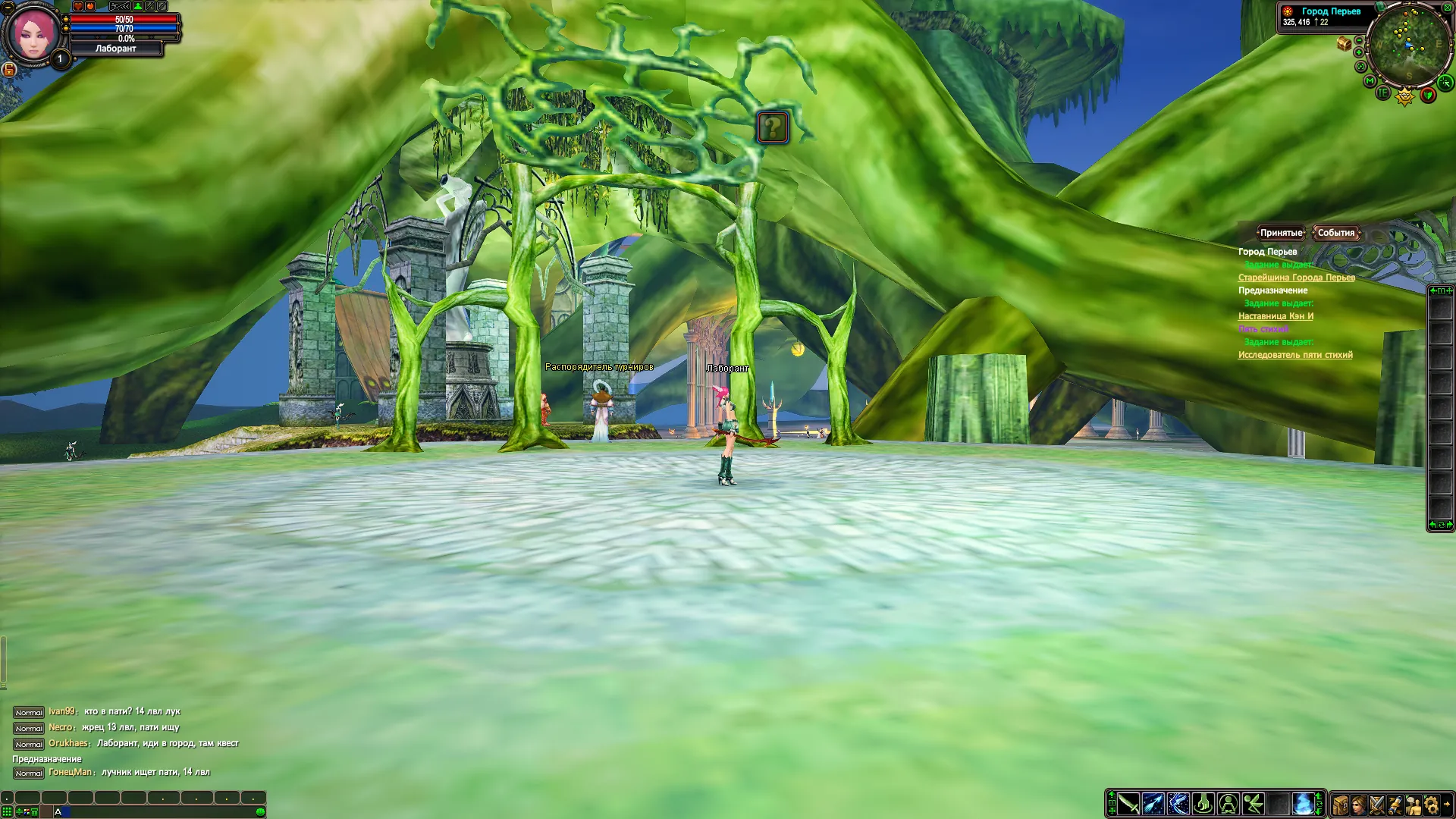
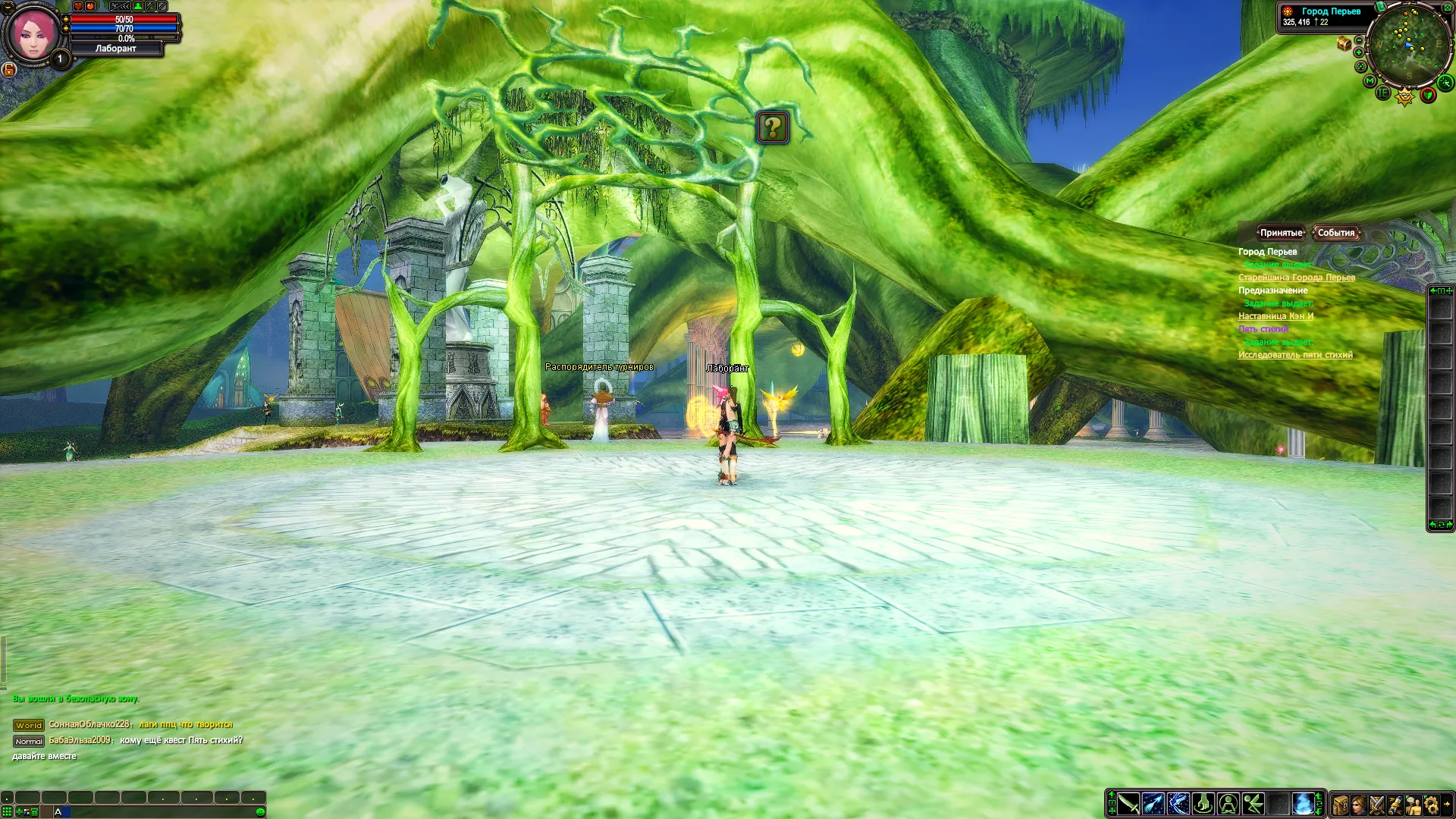
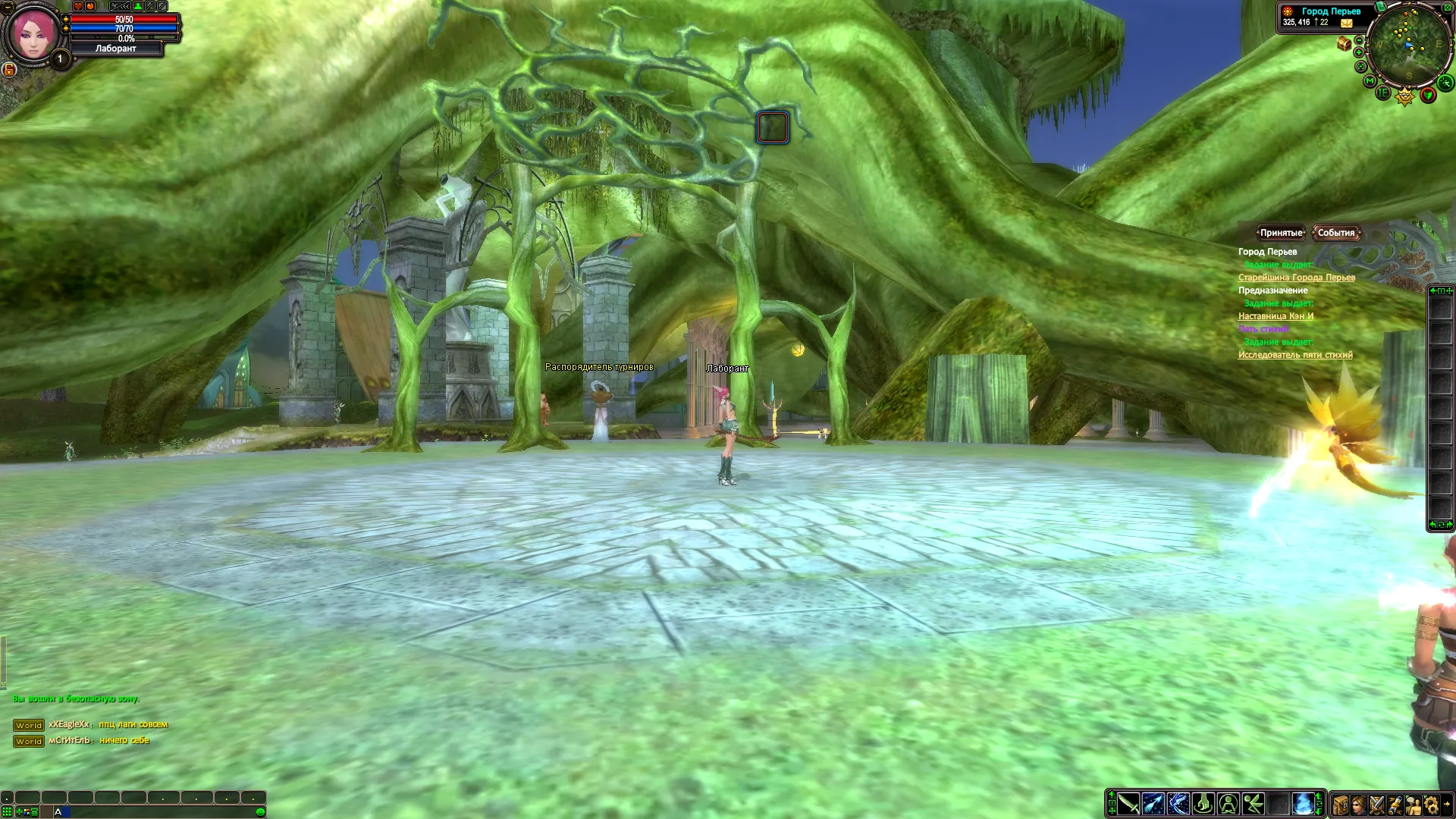
One spot on the main plaza of the City of the Plume at the same time of day, captured at 1920 × 1080 on a GeForce RTX 4070 Laptop GPU. These are real captures from the game, unedited apart from the file format. Residents walk through the plaza, so the people around change from shot to shot.

Enhanced graphics at the highest settings: the plaza of the City of the Plume with sharp stone paving, carved columns and the giant tree's roots overhead. The old client at its highest settings: the same plaza, with blurrier paving and flatter detail on the roots and columns.

Drag the line to compare. Click an image below to open it at full size. These shots were taken with our first, stronger colours; Enhanced graphics now use softer ones.

The old client at its highest settings.
The old client, highest settings.
Enhanced graphics at the highest settings.
Enhanced graphics, highest settings: about 63 frames a second here.
Enhanced graphics at the lowest settings: the same plaza with softer paving and less detail on the roots.
Enhanced graphics, lowest settings: about 180 frames a second here.

Coming: a browser client, phones included

in development A third way in is being built: the game in a web browser, on a PC or a phone, with nothing to install. It plays the same world on the same account, with touch controls on a phone and two graphics levels. It is in testing now. There is no date yet; it opens when it plays well, and the News page will say so.

What your PC needs

The clientWith Enhanced graphics
SystemWindows 10 or 11Windows 10 or 11, 64-bit
GraphicsThe original engine, so no new demandsA card with a Vulkan 1.3 driver, such as a GeForce GTX 1050 or a Radeon RX 470 and newer, with an up-to-date driver
Memory8 GB, 16 GB is better
DiskAn 8.2 GB download, 8.6 GB installed, and about 17 GB free while you unpack
Tested onA GeForce RTX 4070 Laptop GPU and an integrated Radeon 610M so far. Reports from older PCs and from AMD or Intel graphics help most.

To install, unpack the whole archive into a folder and start LivingPW.exe, the launcher. Nothing else is installed, and to remove the game you delete the folder.

What you can check, and what we promise

  • Check the download. Download only from the link in your invitation. The invitation also carries the archive's SHA-256. Before you unpack, compare it in PowerShell with Get-FileHash and the archive's name.
  • Check every file. After unpacking, run Verify.ps1 next to LivingPW.exe. It checks every file against our signed list, and "OK" means the files are exactly the ones we released.
  • Checked before release. Every archive is scanned with Microsoft Defender. Our own release checks fail the build on leftover developer files, private addresses or secrets.
  • Nothing installed into Windows. There is no installer, no service, no driver and nothing that starts with Windows.
  • Our additions send nothing from your computer. No telemetry, no crash uploads, no ads. From the original package we removed its auto-updater, its crash reporter (it sent crash reports to a third party) and a bundled third-party installer.
  • Not code-signed yet. Windows SmartScreen may say "unknown publisher", and an antivirus may distrust our add-on because it changes how the game behaves. Check the hash, and if your antivirus complains, tell us which one and what it said. Please don't just switch it off.
  • A 2008 connection. The game's own connection keeps its original design. Your password is never sent as it is, but the connection is not encrypted to today's standards. Use a password you use nowhere else, play only through the address in your invitation, and use a VPN on public Wi-Fi. We never ask for your password.

This page says what our additions do, not how they are built. Their inner workings stay with us for now, as most servers keep their client changes. What you can always check is that your files are exactly the ones we released.

What to test

Pick what fits your evening. One clear report about one thing is worth more than a long list of "it lags".

  1. Download and check. Does the hash match? Does Verify.ps1 say everything is OK?
  2. First start. LivingPW.exe opens the launcher, and Play should open the classic login with our logo and the news panel. Log in, then create a character or pick one.
  3. Loading screens. Do the tips show dated numbers from your realm?
  4. A city and a field. Walk around a main city and the area where you level. Note the frame rate, and whether it holds when many characters are around.
  5. With Enhanced graphics on. Look at shadows, water, grass and the ground, both up close and in the distance. Watch for flicker, black or missing textures, holes in trees or roofs, and objects that appear late.
  6. The companion window. Open /alt and try each button. Your companion should answer in your language.
  7. The Keeper. Whisper Keeper help, stuck, who is online and where to buy potion.
  8. Getting around. Try /path to an NPC and Alt + click on the big map.
  9. Everyday play. Join a party, trade, enter a dungeon, log out and back in. Also try Alt+Tab, minimise and restore, and switching between a window and full screen.
  10. A long evening. Play for an hour or more. Does the game get slower, or close by itself?

How to report

  • In the game: whisper Keeper report and a few words. It saves where you are and when. The Report button in the companion window does the same.
  • An AI resident broke the illusion: type !break and a few words to it, or in chat next to it.
  • Everything else: write to max@livingpw.com or in the community groups.

What helps us find it:

  • whether Enhanced graphics were on, and the client's language;
  • your Windows version, graphics card and driver version;
  • the time with your time zone, and your character's name;
  • what you did and what happened; for slowdowns, where you stood (the coordinates by the minimap), how many characters were around and your frame rate;
  • a screenshot (Print Screen in the game; they are saved in element\screenshots);
  • if the game closed by itself, the files from element\logs.

Known limits

  • Enhanced graphics are new; if they give you trouble, turn them off in the launcher.
  • The 1.4.6 client sits under the classic look. Some skill and item descriptions still mention features from later versions that this era does not have.
  • Windows only. It has not been tested on Linux (Wine, Proton) or macOS yet, and reports are welcome.
  • The engine is 2008 code and keeps whatever bugs the original had.

Related reading: Start guide, Known limits and Questions and answers.